Place Tokens
Place monsters, NPCs, traps, markers, and light sources on your maps.
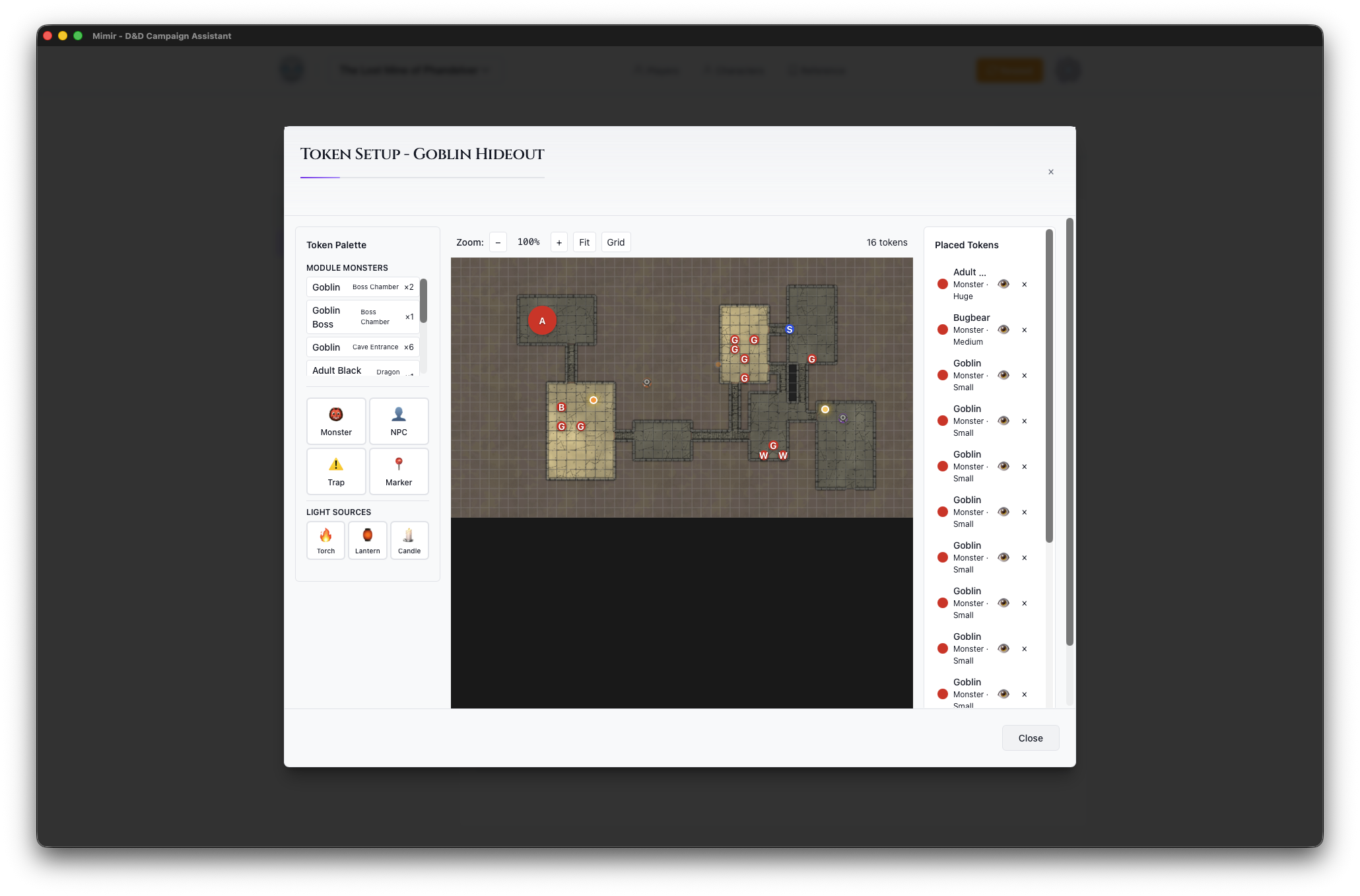
Open Token Setup
- Navigate to a module (Modules tab → select module)
- Find your map in the Maps section
- Click the Place Tokens button on the map card to open Token Setup
Token Palette
The left panel shows available tokens:
- Monsters - Creatures added to this module
- NPCs - Non-player characters assigned to the module
- Traps - Hazards and traps
- Markers - Points of interest
- Light Sources - Torches, lanterns, candles
Placing a Token
- Click a token in the palette
- Configure options (size, color, visibility)
- Click on the map where you want to place it
- The token appears at that location
Token Options
Before placing, you can set:
- Size - Tiny, Small, Medium, Large, Huge, Gargantuan
- Color - Border color for identification
- Visible to Players - Whether players can see this token
Managing Placed Tokens
Tokens appear in the Placed Tokens panel (right side):
- Click to select on the map
- Drag to reposition
- Click × to delete
- Right-click for options
Moving Tokens
- Click and drag a token
- Move to the new position
- Release to place
Tokens snap to grid squares by default.
Tips
- Place monsters before the session starts
- Use different colors to distinguish groups
- Hide tokens for surprise encounters