Token Setup Modal
The Token Setup Modal is where you configure maps, place tokens, and prepare encounters.
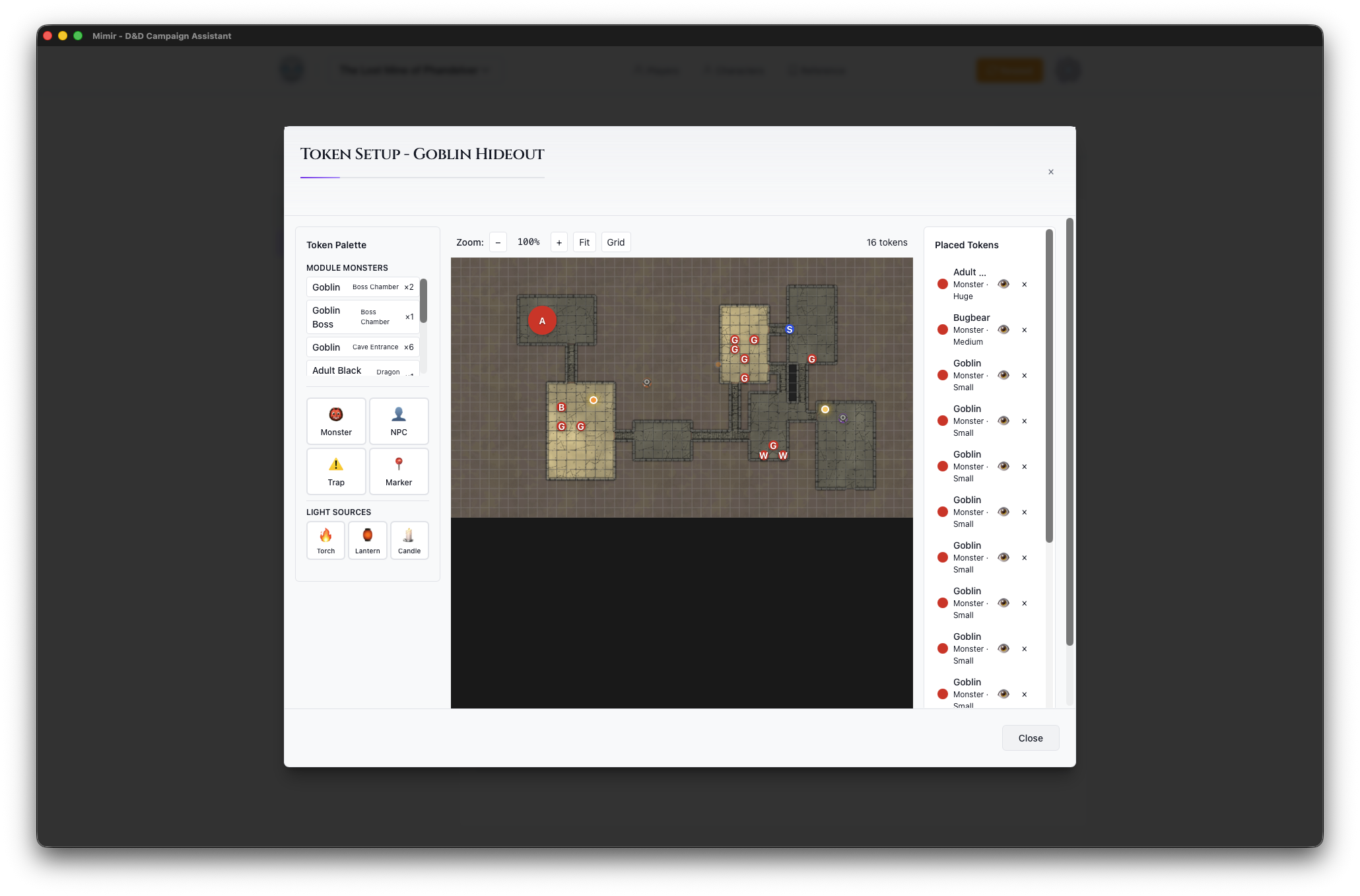
Opening Token Setup
Click the Place Tokens button on a map card in the Module Prep View to open Token Setup.
Layout
Token Palette (Left)
Tools for adding content to the map:
Module Monsters (appears when monsters have been added)
- Quick-select buttons for monsters already in the module
- Shows name, encounter tag, and quantity
Monster
- Search D&D 5e monsters by name
- Shows CR and source book
- Click to select, then click map to place
NPC
- Add NPC tokens
- Select from module NPCs
Trap
- Place trap markers at grid positions
- Optionally link a catalog trap (search by name) — the marker takes the trap’s name
- Trap records store name, description, trigger/effect descriptions, detection DC, triggered state, and player visibility
Marker
- Place point-of-interest (POI) markers at grid positions
- POI records store name, description, icon, color, and player visibility
Light Sources
- Torch (20 ft bright / 40 ft dim)
- Lantern (30 ft bright / 60 ft dim)
- Candle (5 ft bright / 10 ft dim)
Map Canvas (Center)
The main map display:
- Grid Overlay - Aligned to map squares
- Placed Tokens - All tokens on this map
- Trap/POI Markers - Drag to move; right-click for actions (visibility, trigger/reset for traps, edit for POIs, delete)
- Zoom Controls - Adjust view
- Pan - Click and drag to move
Placed Content (Right)
All placed content:
Tokens
- List of all placed tokens
- Click to select on map
- Delete with × button
Light Sources
- All placed lights
- Lit/Unlit toggle
- Delete with × button
Traps
- Shows name, DC (if set), and triggered state
- Vis/Hid toggle for player visibility
- Delete with × button
Points of Interest
- Shows name and icon type
- Edit, Vis/Hid toggle, and delete buttons
Canvas Controls
Located above the map:
- Zoom - +/- buttons and percentage
- Reset - Fit map to view
Token Options
When placing tokens:
| Option | Description |
|---|---|
| Size | Tiny, Small, Medium, Large, Huge, Gargantuan |
| Color | Border color for identification |
| Visible | Whether players can see this token |
See Also
- Place Tokens — Step-by-step placement workflow
- Manage Traps and POIs — Placing and running trap/POI markers
- Add Monsters
- Manage Light Sources
- Play Mode — Where placed content is used in session